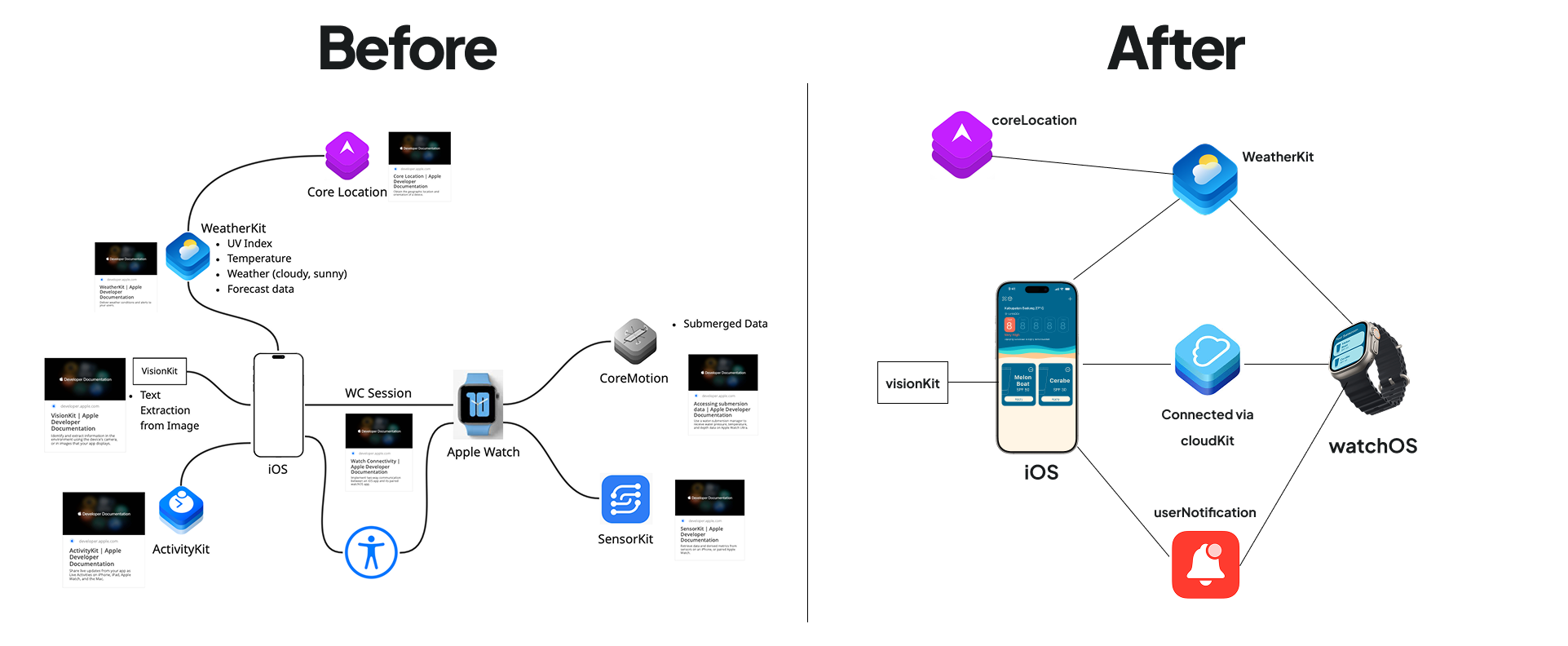
reSPF started as a group project built during the Apple Developer Academy. After a while I decided to fix the bug and simplify it. I cloned the repo, cleaned it up, and eventually pushed it to the App Store.
Here's what I changed and why.
1. JSON → SwiftData
Previously, sunscreen collection data and timer state were stored as JSON files. Personal data like skin type was kept in a class object, and settings were scattered across @AppStorage.
I consolidated everything into SwiftData:
- Sunscreen products and their SPF data
- Timer state and reapplication history
- User profile data (skin type)
- App settings (previously in
@AppStorage)
The main challenge was defining the right schema — particularly figuring out relationships between models and deciding what needed to be persistent versus computed. I used AI assistance to work through the schema design, and it saved a lot of back-and-forth.
The result is a single source of truth that's queryable, type-safe, and integrates naturally with SwiftUI.
2. WatchConnectivity → CloudKit
The original implementation used WCSession (WatchConnectivity) to sync data between iPhone and Apple Watch. It worked, but it required keeping both devices connected and managing message passing manually.
I replaced this with CloudKit, which handles sync automatically via iCloud. The iPhone and Watch each have their own AppContainer, but they both point to the same CloudKit-backed SwiftData store. Changes made on one device propagate to the other without any manual sync logic.
This simplified the architecture significantly — no more WCSessionDelegate, no manual state diffing, and the sync is passive.
3. Feature-Based MVVM Architecture
The original project had two top-level folders: View and ViewModel. All views went in one, all view models in the other.
I restructured it into feature-based modules:
Features/
  Timer/
    TimerView.swift
    TimerViewModel.swift
  Sunscreen/
    SunscreenView.swift
    SunscreenViewModel.swift
  Profile/
    ...
Core/
  WeatherManager.swift
  LocationManager.swift
  NotificationManager.swift
The Core folder contains managers that wrap Apple frameworks — WeatherKit, CoreLocation, and UserNotifications. Each manager conforms to a protocol, so ViewModels depend on abstractions rather than concrete implementations. This makes the code easier to test and swap out later.
4. @Observable Instead of ObservableObject
The old ViewModels conformed to ObservableObject and used @Published on every property. With @Observable (introduced in iOS 17), all stored properties are observable by default — no annotation needed.
// Before
class TimerViewModel: ObservableObject {
    @Published var remainingTime: TimeInterval = 0
    @Published var isRunning: Bool = false
}

// After
@Observable
class TimerViewModel {
    var remainingTime: TimeInterval = 0
    var isRunning: Bool = false
}
The main benefit is less boilerplate. You also no longer need @StateObject or @ObservedObject in views — just @State for owned instances or direct property access for injected ones. It's a cleaner mental model.
5. Algorithm as a struct
The reapplication algorithm was originally implemented as a class. I rewrote it as a struct.
The algorithm doesn't hold mutable state between calls — it takes inputs, runs calculations, and returns a result. A struct is the right fit for this: value semantics, no need for reference counting, and it's immediately clear that there are no side effects. The code became noticeably easier to reason about.
6. Dependency Injection via AppContainer
I introduced an AppContainer that owns and creates all dependencies:
final class AppContainer {
    let weatherManager: WeatherManagerProtocol
    let locationManager: LocationManagerProtocol
    let notificationManager: NotificationManagerProtocol

    init() {
        self.weatherManager = WeatherManager()
        self.locationManager = LocationManager()
        self.notificationManager = NotificationManager()
    }

    func makeTimerViewModel() -> TimerViewModel {
        TimerViewModel(
            weatherManager: weatherManager,
            locationManager: locationManager,
            notificationManager: notificationManager
        )
    }
}
Core managers are shared across ViewModels — they're created once and injected where needed. The Watch app has its own AppContainer, but shares the same CloudKit-backed data layer.
The main motivation was testability — factory methods on the container make it straightforward to swap real managers for mocks in tests. It also makes dependency flow explicit rather than hidden behind singletons.
Closing Thoughts
This refactor wasn't required — the app worked before. But working through it in my spare time gave me a much clearer understanding of how architecture decisions compound over time. Every change here made the next one easier.
If I were to add one more thing: unit tests. The new structure — protocols, structs, and proper DI — makes the codebase much more testable than before. That's next.